Sign up for "Implementing a Kill Switch for AI" on Sep 22nd
Join the Unleash team to learn how to integrate runtime control in your AI strategy.
Using Feature Flags to Enable Trunk-Based Development

Michael Ferranti
VP of Strategy
February 16, 2026
Most engineering teams know the pain of “merge hell.” You spend two weeks building a feature on a dedicated branch, only to find that the main branch has moved on without you. The result is a painful afternoon of resolving conflicts, regression testing, and praying that the integration doesn’t break production.
Trunk-based development (TBD) solves this by requiring developers to merge code to the main branch (the “trunk”) frequently, often multiple times a day. But this introduces a new tension regarding how you merge unfinished code into a production-ready trunk without breaking the user experience.
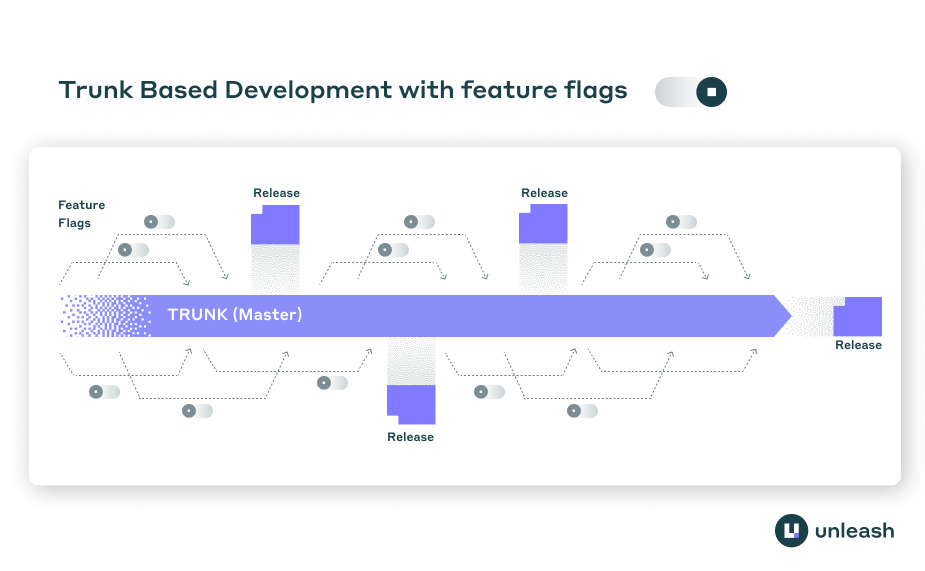
The answer lies in separating deployment from release. Feature flags provide the control mechanism to ship code constantly while keeping unfinished features dormant. Decoupling these events allows teams to move fast, satisfy Continuous Integration (CI) requirements, and maintain stability.
TL;DR
- Long-lived feature branches delay integration and increase the risk of merge conflicts.
- Trunk-based development requires merging to the main branch daily, even for incomplete features.
- Feature flags wrap unfinished code paths, allowing you to deploy to production without releasing to users.
- Successful implementation requires strict lifecycle management to avoid accumulating technical debt.
- Governance and automated testing are non-negotiable when managing runtime configuration at scale.
The continuous integration mandate
To understand why feature flags are necessary for trunk-based development, you first have to look at what high-performing teams are actually trying to achieve. According to DORA (DevOps Research and Assessment), trunk-based development is a required practice for true Continuous Integration.
If developers are working on long-lived branches that exist for days or weeks, they are not practicing CI. They are practicing delayed integration. The DORA metrics indicate that elite performers who deploy on demand are characterized by having fewer than three active branches and branches that live for less than a day.
Daily merging creates a logistical problem because significant features almost always take longer than a single day to build. If you must merge to trunk daily to satisfy the requirements of CI, but the feature takes two weeks to complete, you need a way to prevent half-baked logic from affecting your users.
Historically, teams used “release branches” to stabilize code before shipping. Stabilization phases lock the codebase and slow down everyone else, making feature flags a superior alternative for maintaining a “releasable trunk.”
Decoupling deployment from release
The core concept that enables this workflow is the separation of deployment (a technical task) from release (a business decision).
- Deployment is moving code to your servers or distributing it to client devices.
- Release is exposing that code’s functionality to users.
In a traditional model without flags, these two events happen simultaneously. When the code lands in production, the user sees it. In a trunk-based model supported by feature flags, these events are distinct. You can deploy the code for a new checkout flow fifty times over two weeks, but the user continues to see the old checkout flow until you flip the switch.
Teams can implement trunk-based development using feature flags by treating the flag as a protective wrapper. The code exists in the trunk, it is compiled and deployed, but the execution path is unreachable for the general public.
Branch by abstraction
For complex refactors or architectural changes, this often takes the form of “Branch by Abstraction.” Instead of creating a Git branch, you create an abstraction layer in the code.
- Create an interface for the functionality you are changing.
- Route the old implementation through this interface.
- Build the new implementation behind a feature flag.
- Switch the flag to route traffic to the new implementation.
- Remove the old implementation and the flag once stable.
Such a process allows you to rewrite core systems while committing to trunk every few hours, validating that your changes don’t break the build or the existing logic.
Implementing the Keystone Interface pattern
In many cases, the cleanest way to implement Branch by Abstraction is through the “Keystone Interface” pattern. This technique helps you handle granular changes without scattering if/else statements throughout your entire codebase.
Instead of wrapping every function call in a feature flag check, you rewrite the consuming code to call an interface. You then create a factory or a provider that determines which implementation of that interface to return based on the feature flag state.
For example, if you are replacing a legacy PaymentProcessor, you would:
- Extract an IPaymentProcessor interface that covers the methods you need.
- Make the original LegacyPaymentProcessor implement this interface.
- Create a ModernPaymentProcessor that also implements it.
- Use a factory method to inject the correct implementation at runtime:
function getPaymentProcessor(userContext) {
    if (unleash.isEnabled("modern-payment-processor", userContext)) {
        return new ModernPaymentProcessor();
    }
    return new LegacyPaymentProcessor();
}
Isolating the conditional logic to a single location (the factory) keeps the rest of your application code clean and unaware of the transition. The pattern also simplifies testing, as you can easily unit test ModernPaymentProcessor in isolation without mocking the feature flag client in every test suite.
The development lifecycle with flags
Adopting this workflow changes the daily routine of a developer. Instead of writing code and then hoping it merges cleanly later, the process shifts to managing availability at runtime.
1. Verification and local development
Work begins by defining the flag. In local development environments, you might toggle the flag on to build responsiveness or test logic. Because strict trunk-based development discourages long-lived branches, you merge this initial setup immediately (the flag definition and valid, inert code).
2. Dark launching to production
As you flesh out the feature, you continue merging small batches of code. This code is deployed to production, effectively “dark launching” the feature. It is present in the artifact but not active.
Validating code in the production build offers a distinct advantage over feature branches: accurate integration testing. Because your code is sitting in the production build, you know it compiles and integrates with other recent changes. You avoid the “works on my machine” or “works on my branch” syndrome.
3. Targeted release and testing
Once the feature is functionally complete, you don’t just turn it on for everyone. Activation strategies allow you to target specific users. You typically start by enabling the flag only for internal users (your QA team or product managers) using user IDs or email domains. This allows you to test in production—the only environment that truly matters—without risking customer experience.
4. Progressive rollout
After internal verification, you expand the audience. You might roll out to a 1% “canary” cohort or a specific customer segment. Monitoring observability tools during this phase is critical. If error rates spike, you disable the flag immediately. The keep the trunk deployable philosophy ensures that even if a new feature causes bugs, the trunk itself remains stable because the bad code path can be bypassed instantly without a new deployment or git revert.
Managing the complexity of conditional logic
Feature flags solve the merge conflict problem, but the underlying complexity of managing multiple code paths still needs to be addressed. Without discipline, scattered if/else checks can make a codebase harder to reason about and test.
Technical debt and cleanup
Technical debt management is the most critical operational requirement for successful trunk-based development. If you leave flags in the codebase indefinitely, you increase the “carrying cost” of the software. Engineers have to account for dead code paths, and testing matrixes explode in size.
To mitigate this, teams should treat flag removal as part of the definition of done. A feature is not finished when it is released; it is finished when the flag protecting it is removed. Technical debt rating systems can help track which flags have overstayed their welcome, marking them as stale if they exceed their expected lifetime (e.g., 40 days for a standard release flag).
Categorizing flags to manage lifecycle
Not all feature flags are the same, and treating them effectively requires categorizing them by their longevity and purpose. In a trunk-based workflow, you will primarily deal with Release Toggles. These are intended to be short-lived (weeks or days) and their only purpose is to decouple deploy from release.
However, as your system matures, you will likely introduce other types:
- Ops Toggles: These control detailed system behavior, such as logging levels or circuit breakers. They may live for years and are owned by SREs or platform engineers.
- Experiment Toggles: These are used for A/B testing and multivariate optimization. They live for the duration of the experiment study.
- Permission Toggles: These verify if a specific user (like a beta tester or premium subscriber) can access a feature. These are permanent fixtures of your architecture.
Confusing these categories is a primary source of technical debt. If you treat a Release Toggle like a Permission Toggle, you will never remove it, cluttering the trunk with dead logic. Explicitly labeling your flags, and setting automated cleanup alerts based on the category, ensures that short-lived release flags don’t accidentally become permanent architectural fixtures.
Testing strategies
A common fear is that feature flags require checking every possible combination of states. If you have 10 flags, do you need to test $2^{10}$ scenarios?
In practice, this is unnecessary. For trunk-based development, you primarily care about two states:
- The current production state: All established flags are on, and the new feature flag is off.
- The future state: The new feature flag is on.
You generally do not need to test legacy states for flags that are already fully rolled out but not yet cleaned up, nor do you need to test interaction effects between completely unrelated features unless they touch the same shared resources.
Focus your automated testing on the expected configuration. Integration tests should be able to run with specific flags forced on or off to verify both the new path and the fallback path.
Governance and safety
When you move control from a deployment pipeline to a runtime control plane, you must treat your flagging system with the same rigor you treat your production infrastructure. Inadequate safeguards in configuration management have famously led to massive failures in the financial sector, proving that runtime switches are powerful and dangerous.
Role-based access and approvals
Not every developer should be able to toggle a flag for 100% of users in the global production environment. Trunk-based development encourages democratized code ownership, but release management requires guardrails.
Using systems that enforce the four-eyes principle ensures that changes to sensitive flags require peer review and approval. Peer approvals mimic the safety of a pull request review but apply it to the runtime configuration.
Auditability
Because changes happen instantly without a code deploy, you need a detailed, immutable audit log. You must be able to answer who changed the flag, when they changed it, and why. This is non-negotiable for regulated industries where compliance requires traceability for every change to the system behavior.
Scaling safe releases
Trunk-based development transforms software delivery from a series of high-risk “big bang” merges into a continuous flow of value. It creates a rhythm where integration is a non-event and releases are controlled business decisions. However, you cannot separate TBD from the mechanism that makes it safe. Without feature flags, merging incomplete code to the trunk is reckless; using them turns it into a strategic advantage.
Platforms like Unleash execute this at scale by evaluating flags locally to ensure speed and privacy, while providing the governance controls needed to manage change requests and automate technical debt cleanup. Formalizing the lifecycle of your flags ensures that your move to trunk-based development accelerates your team rather than slowing it down with complexity.
FAQs about feature flags and trunk based development
How does trunk-based development differ from GitFlow?
Trunk-based development focuses on a single shared branch where all developers merge code at least daily, using feature flags to hide incomplete work. GitFlow relies on long-lived feature branches, develop branches, and release branches, which isolates work but delays integration and increases the risk of complex merge conflicts.
When should I delete a feature flag in a trunk-based workflow?
You should delete a release flag as soon as the feature has been fully rolled out to 100% of users and verified as stable in production. Keeping flags longer than necessary creates technical debt and increases the complexity of testing and maintenance.
Can I implement database changes using feature flags?
Yes, but it requires the “expand and contract” pattern. First, you expand the database schema to support both the old and new structures (e.g., add a new column but keep the old one). Then, use a feature flag to control which column the application reads from and writes to, allowing you to roll back if needed before eventually removing the old schema.
Do feature flags replace branch protection rules?
No, feature flags complement branch protection rules but do not replace them. You still need branch protection to ensure code passes automated tests and peer reviews before merging to the trunk; feature flags simply control the visibility of that code after it has been validly merged and deployed.
How do I handle testing when using feature flags?
You should focus testing on the configuration that is currently in production and the configuration you intend to release next. It is not necessary to test every combinatorial possibility of all flags; instead, ensure your integration tests cover the active flag states and that your unit tests verify the logic inside both the on and off paths of the toggle.
Share this article