Sign up for "Implementing a Kill Switch for AI" on Sep 22nd
Join the Unleash team to learn how to integrate runtime control in your AI strategy.
How are progressive delivery workflows managed in trunk-based deployments?

Alex Casalboni
Developer Advocate
December 11, 2025
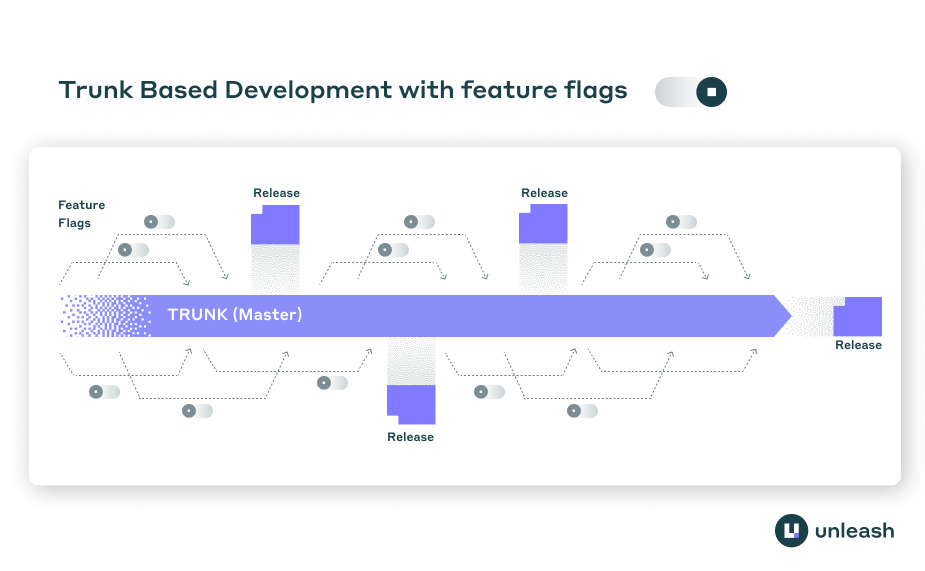
Trunk-based development requires developers to merge code into the main branch frequently, often multiple times per day. This creates a problem: how do you keep unfinished features from reaching users while maintaining a releasable main branch? Progressive delivery workflows solve this through feature flags, which separate code deployment from feature release.
Decoupling deployment and release
In trunk-based development, code goes to production whether a feature is ready or not. The traditional approach of keeping features in separate branches until completion defeats the purpose of trunk-based workflows. Long-lived feature branches create merge conflicts, slow down integration, and make it harder to collaborate.
Feature flags let developers merge incomplete code to main while keeping features hidden from users. A flag wraps the new code path, defaulting to “off” in production. The code deploys, but the feature remains invisible. Developers can toggle the flag “on” in development or testing environments without affecting production users.
This separation matters because deployment and release serve different purposes. Deployment is a technical operation that moves code to production servers. Release is a business decision about when users should access new functionality. By controlling these independently, teams can deploy continuously without forcing premature releases.
Progressive rollout strategies
Once a feature is complete, teams rarely flip it on for everyone at once. Progressive delivery uses gradual rollouts to limit the blast radius of potential issues. Several strategies control which users see new features:
Percentage-based rollouts expose features to an increasing portion of users. A team might start with 5% of traffic, monitor metrics, then expand to 25%, 50%, and finally 100%. If error rates spike or conversion drops, the rollout stops or reverses. This approach catches problems before they affect the entire user base.
Segment-based targeting shows features to specific user groups. Internal employees might test first, followed by beta users, then premium customers, and finally the general public. Geographic targeting enables region-specific rollouts, useful for testing performance across different network conditions or validating features for specific markets.
Canary deployments route a small subset of production traffic to the new version while most users continue seeing the stable version. Teams monitor key metrics during the canary phase. If the canary version performs well, traffic gradually shifts to the new version. If metrics degrade, traffic returns to the stable version.
Ring-based deployment combines these approaches, rolling out changes in concentric circles. The development team uses the feature first, then internal employees, then select external users, and finally all users. Each ring provides feedback before expanding to the next.
Managing feature flags in production
Trunk-based teams need systems to create, configure, and clean up feature flags. A feature flag platform provides the control plane for progressive delivery workflows.
Creating a flag starts with wrapping new code in a conditional check. The code queries the flag platform to determine if the feature should be active for the current user. The platform returns a boolean based on the configured rollout strategy and the user’s attributes.
Strategy constraints enable targeted rollouts based on user location, environment, subscription tier, or custom attributes. A music education company might enable a playlist feature for iOS users in North America before expanding to other platforms and regions. Constraints combine to create complex targeting rules without modifying application code.
Runtime configuration changes let teams adjust rollouts without redeploying code or configuration files. If a feature causes problems, operators can disable it immediately through the flag platform’s interface. The change propagates to application servers within seconds, stopping the issue faster than a code deployment or rollback would.
Coordinating flags across distributed systems
Modern applications run across multiple services, platforms, and client applications. Progressive delivery in these environments requires coordinating flag state across the entire technology stack.
A centralized feature flag platform maintains the source of truth for flag configurations. Mobile apps, web applications, backend services, and third-party integrations all query this platform. When an operator changes a flag’s rollout percentage or targeting rules, the change applies everywhere.
Client-side SDKs cache flag values to reduce latency and handle network failures. The SDK queries the platform periodically to refresh cached values, then evaluates flags locally based on the current user’s attributes. This architecture prevents flag checks from adding network latency to every request.
Version compatibility becomes relevant when deploying to app stores. iOS and Android users don’t update apps simultaneously. A flag might control a feature that requires both client and server changes. The platform can target the flag based on app version, ensuring users with older clients don’t access features that require newer code.
Monitoring and automated responses
Progressive delivery workflows depend on observability. Teams need to know if a rollout is causing problems before expanding to more users. Feature flag platforms integrate with monitoring systems to enable data-driven decisions.
Impression data tracks when flags are evaluated and what values they return. This data flows to analytics platforms where teams can correlate flag exposure with user behavior, error rates, and business metrics. If users who see a new checkout flow convert at a lower rate, the data surfaces this quickly.
Some platforms support automated responses to telemetry. A team might configure a flag to automatically pause a rollout if error rates exceed a threshold. The system monitors metrics, detects the spike, and stops the rollout without human intervention. This reduces mean time to recovery for incidents.
Kill switches extend this concept to operational concerns. If a downstream service experiences issues, operators can disable features that depend on it. The application degrades gracefully instead of failing completely. For time-sensitive features like holiday promotions, kill switches enable instant deactivation when the promotion ends.
Technical implementation patterns
Implementing progressive delivery in trunk-based workflows requires specific coding patterns. Developers wrap new features in conditional blocks that check flag state, something like:
const user = req.user; // however you attach auth info
const context = {
    userId: user.id,
    properties: {
        country: user.country, // e.g. "UK"
        customerTier: user.tier
    }
};

const isLive = unleash.isEnabled("billing-live", context);

if (!isLive) {
    return res.json({
        status: "degraded",
        message: "Message"
    });
}
The flag check happens at runtime, not build time. This lets the same deployed code serve different experiences to different users.
Gradual code rollout differs from gradual feature rollout. In trunk-based development, code reaches all servers quickly through continuous deployment pipelines. Feature flags then control which users can access that code. This separation enables testing in production with real infrastructure while limiting user exposure.
Stickiness ensures users see consistent experiences across sessions. When a user is assigned to a flag variant, a session ID or user ID determines their assignment. The same user always sees the same variant, even as the overall rollout percentage increases. Without stickiness, users might flip between old and new experiences, creating confusion.
Flag lifecycle management
Feature flags in trunk-based workflows have different lifecycles. Release flags wrap new features during development and initial rollout. Once a feature reaches 100% rollout and proves stable, developers remove the flag and the conditional logic. These flags are temporary, typically living for weeks or months.
Operational flags control system behavior and may live indefinitely. Kill switches for external dependencies or circuit breakers fall into this category. Teams keep these flags because they provide ongoing operational control.
Permission flags gate features based on user entitlements or account tier. Premium features might remain behind flags permanently, serving as the mechanism for access control.
Technical debt accumulates when release flags aren’t removed after rollout completes. Code becomes harder to understand as the number of conditionals grows. Teams need processes to track flag age and clean up flags that have served their purpose.
Key considerations for trunk-based teams
Progressive delivery workflows require different tooling and processes than feature branch workflows:
- Flag platforms must handle high query volume since every user request may evaluate multiple flags
- Client SDKs need local evaluation to avoid adding latency to critical paths
- Teams need runbooks for common scenarios like rolling back a flag or expanding a canary
- Developers must understand flag semantics to avoid shipping code that breaks when flags toggle
- QA processes need to test both flag states and the transitions between them
The combination of trunk-based development and progressive delivery enables teams to deploy continuously while maintaining fine-grained control over feature releases. By separating deployment from release and using gradual rollouts, teams reduce risk and gather real-world feedback before committing to full launches.
Share this article